
EZContact vs Respond.io: Which WhatsApp Platform Delivers More in 2026?
Comparing EZContact and Respond.io for WhatsApp? This honest breakdown covers AI capabilities, setup complexity, pricing, and human handoff — so you can pick the right platform for your team.
Both EZContact and Respond.io connect WhatsApp to your business. But they’re built on very different assumptions about who should do the work — and that difference shows up the moment you try to go live.
If you’ve been evaluating messaging platforms and landed on this comparison, you’re probably asking the same core question: Do I need a full omnichannel CRM suite with workflow builders, or do I need a WhatsApp AI agent that my team can actually use this week?
This article answers that honestly — including when Respond.io is the better choice.
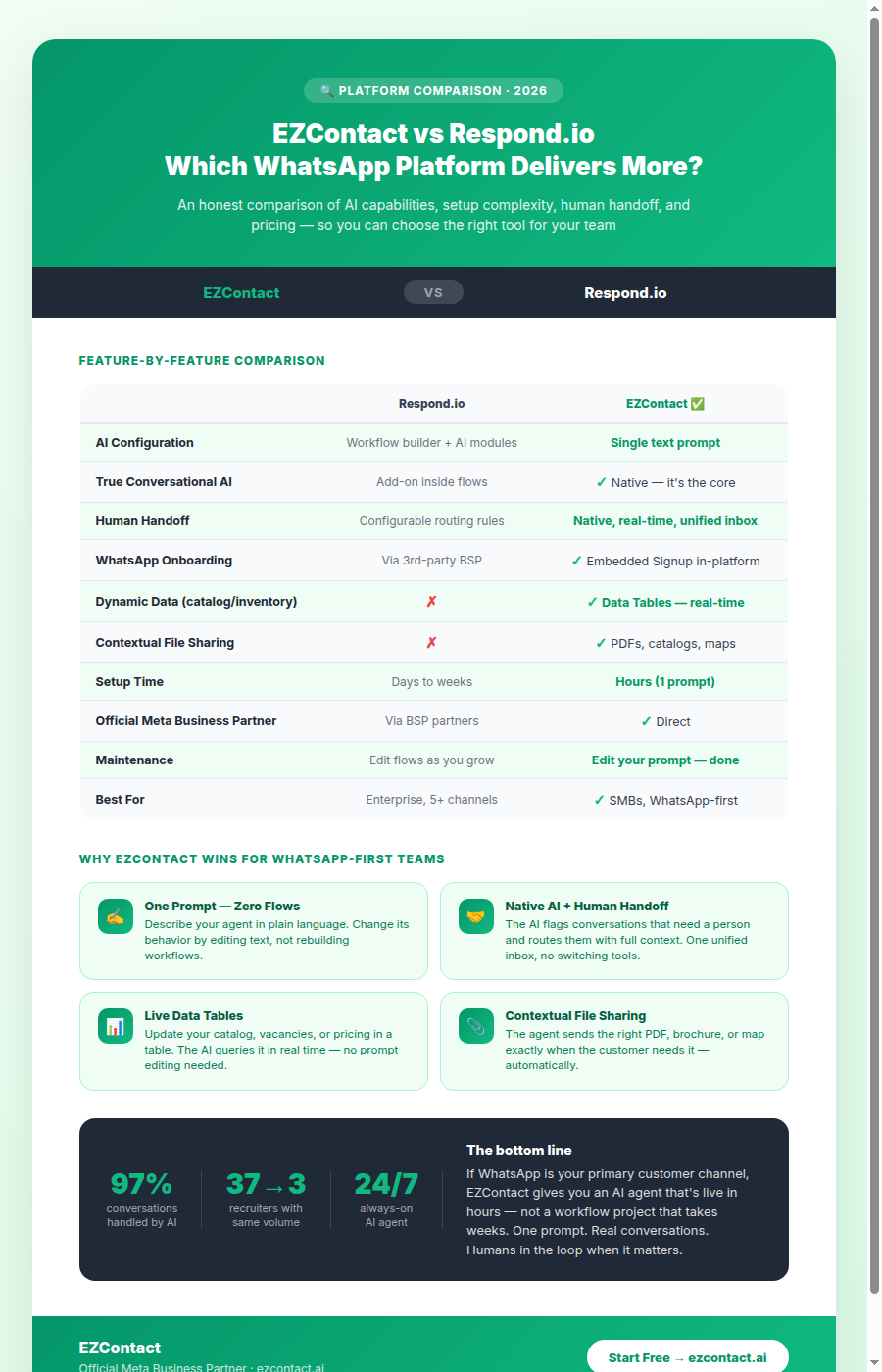
Quick Comparison
| Respond.io | EZContact | |
|---|---|---|
| What it is | Omnichannel CRM & messaging suite | WhatsApp AI agent + unified messaging platform |
| AI configuration | Workflow builder + AI add-ons | Single text prompt — no flows |
| Human handoff | Conversation routing, configurable | Native, real-time, unified inbox |
| Channels | WhatsApp, IG, FB, Telegram, Line, Viber, + | WhatsApp, Instagram, Facebook |
| WhatsApp setup | Via third-party BSP or Meta API | Embedded Signup inside the platform |
| Pricing model | Per-seat + conversation tiers | Per workspace, predictable monthly |
| Best for | Enterprise teams with complex multi-channel needs | SMBs wanting WhatsApp AI live this week |
| Setup time | Days to weeks (flows, routing, integrations) | Minutes to hours (one prompt, done) |
What Respond.io Does Well
Respond.io has been in the market since 2017 and has earned its reputation as a mature omnichannel platform. If your business genuinely needs to centralize conversations across WhatsApp, Telegram, Line, Viber, Instagram, Facebook, email, and live web chat — all in one place, with complex routing rules and a sophisticated CRM layer — Respond.io handles that well.
Its workflow automation builder lets teams design conversation routing logic, assign conversations based on rules, trigger external webhooks, and integrate with CRMs like Salesforce or HubSpot. For organizations that have a dedicated operations person to build and maintain these flows, and that need that depth of multi-channel CRM, it’s a serious tool.
Respond.io wins when:
- Your business operates across 5+ messaging channels beyond WhatsApp
- You need enterprise-grade CRM integrations and have a team to implement them
- You have a technical or RevOps resource to build and maintain workflow automations
- You’re in a market where Telegram, Line, or Viber are the primary channels
Where Respond.io Falls Short for Most SMBs
For the majority of small and mid-sized businesses, Respond.io’s power is also its friction.
Setup is not fast. Getting a working AI agent on WhatsApp requires connecting your BSP or Meta API credentials, building conversation flows in the workflow editor, configuring AI steps within those flows, setting routing rules, and testing edge cases. There’s no “write one prompt and launch.”
AI is an add-on, not the foundation. Respond.io’s core architecture is a flow builder — AI responses are added as a module inside a flow. This means you’re still thinking in terms of decision trees and branching logic. When a customer says something your flow didn’t anticipate, the experience breaks down.
Pricing scales in ways that are hard to predict. Respond.io charges per seat and per conversation volume tier, and the tiers can add up quickly once your team grows or your WhatsApp volume increases.
Channel breadth has a cost. The platform is optimized for a wide surface area of channels. If WhatsApp is 90% of your customer communication — which is the reality for most LATAM businesses — that surface area doesn’t help you; it just adds complexity.
How EZContact Is Built Differently
EZContact starts from a different premise: most businesses need WhatsApp AI that works, not a multi-channel CRM to configure.
As an official Meta Business Partner, EZContact handles the WhatsApp infrastructure — authentication, webhooks, API updates, even the onboarding of your phone number via Meta’s Embedded Signup directly inside the platform. You don’t need a third-party BSP or developer setup.
The configuration model is fundamentally different. Instead of a workflow builder, you write one prompt that describes how your AI agent should behave:
“You are Sofía, virtual assistant for Lozano Consulting. Answer questions about our services, collect the prospect’s name, company, and project scope, and hand off to a consultant when the prospect is ready for a quote or mentions a budget over $10,000.”
That’s the entire setup. The AI understands free-form messages, handles variations in how real people write, and escalates to the right team member when it needs to.
The Differentiators That Matter Most
1. Native Human Handoff in a Unified Inbox
Both platforms support human handoff — but EZContact’s implementation is tightly integrated. When the AI agent determines a conversation needs a person, it flags it in the shared team inbox and routes it to the right team member, with the full conversation history visible. The customer stays in WhatsApp. The human agent steps in with full context.
There’s no separate “live chat” module to configure. There’s no separate inbox to check. It’s one unified inbox where AI and humans work together.
In Respond.io, handoff works through routing rules you configure. It’s functional, but requires more setup and is part of a larger system with more moving parts.
2. AI Configured in One Prompt vs. Flow Builder
This is the largest practical difference for most teams.
In Respond.io, building an AI-powered conversation requires designing a workflow: define entry points, add AI response steps, set conditions for branching, configure escalation rules, test the flow. If the business changes — new service, new pricing, new team member — you edit the flow.
In EZContact, you update the prompt. You describe in plain language how the agent should handle the new service or new pricing. That’s it.
For a small business owner or a marketing manager, the difference between “update my instructions” and “edit my automation workflow” is the difference between a tool they actually maintain and one they abandon after the first month.
3. Dynamic Data Without Editing Prompts
EZContact’s Datos (Data Tables) feature lets you manage structured information — product catalogs, service menus, available inventory, job openings, pricing tiers — in a table the AI queries in real time.
When your gym adds a new class, or your recruiting agency opens three new positions, or your clinic updates its appointment availability, you update a table. The AI agent’s responses automatically reflect the change. You never touch the prompt.
This is the kind of operational flexibility that scales.
4. Contextual File Sharing
EZContact AI agents can send files — PDFs, catalogs, brochures, maps, instructions — at the right moment in a conversation. A recruiting agent sends a location map to candidates who clear the initial screening. A dental clinic sends post-treatment care instructions when a patient books their procedure.
You upload the file once and describe when it should be shared. The agent handles the rest.
Real Business Scenario: Recruiting Agency
A recruiting agency that handles 500+ candidate inquiries per month used to assign multiple recruiters to WhatsApp full time.
With EZContact, the AI agent handles the initial screening conversation: collects candidate name, role applied for, availability, and experience. Qualified candidates are automatically routed to a recruiter with the full screening transcript — and the agent sends a location map for the interview. The recruiting agency went from needing a large team to handle that volume to a fraction of the headcount.
Could this be built on Respond.io? Technically, yes — with the right workflow setup and AI configuration. But the configuration effort, ongoing maintenance, and cost structure make it a harder case to justify for a team that size.
Pricing: What You Actually Pay
Respond.io is transparent about its plans but the numbers add up:
- Starter: ~$79/month (3 users, 1 inbox, limited automations)
- Growth: ~$159/month (5 users, unlimited channels)
- Advanced: ~$279/month (10 users, SLA, priority support)
- Plus conversation-based charges depending on your WhatsApp BSP
EZContact offers a simpler, workspace-based model with no per-conversation surprises. For a team of 3–10 agents handling WhatsApp, Instagram, and Facebook, the total monthly cost is predictable and competitive — especially for LATAM businesses billing in MXN.
See current pricing at ezcontact.ai →
When You Should Choose Respond.io
Be honest about what you actually need. Respond.io is the right choice if:
- Your customer communication is genuinely spread across 5+ channels including Telegram, Line, or Viber
- You have RevOps or engineering resources to build and maintain workflow automations
- You need deep integrations with Salesforce, HubSpot, or other enterprise CRMs out of the box
- Your team has more than 20–30 agents and needs enterprise governance features
When EZContact Is the Right Answer
EZContact is the right choice if:
- WhatsApp is your primary customer channel (plus Instagram/Facebook)
- You want an AI agent live in hours, not weeks
- You want to update agent behavior by editing text, not rebuilding flows
- Your product or service info changes frequently and you want the AI to reflect that automatically
- You need human agents to pick up conversations cleanly, with full context, without switching tools
- You’re a team of 1–20 and need a tool the whole team can use without training
One Prompt. No Flows. Real Results.
The question isn’t which platform has more features. It’s which platform gets your team results without becoming a project in itself.
EZContact is designed so that the person closest to your customers — not your IT department — can configure, update, and run your WhatsApp AI agent.
Start your free trial at ezcontact.ai →
Or message us on WhatsApp if you want to see the platform live with your specific use case. We’ll walk you through it.
Related articles
Aug 2026
EZContact vs Yalo: Best WhatsApp AI Platform for LATAM?
Compare EZContact vs Yalo for WhatsApp AI, conversational commerce, human handoff, implementation, and the right business fit in LATAM.
Aug 2026
EZContact vs Salesforce Service Cloud: WhatsApp Service Without Enterprise Complexity
Comparing Salesforce Service Cloud and EZContact for WhatsApp customer service? See the honest 2026 breakdown of AI, handoff, setup, pricing, and fit.
Aug 2026
WhatsApp Voice AI: Handle Calls, Voicemails & Customer Service with an AI Agent
WhatsApp Voice AI combines a 24/7 AI phone agent with WhatsApp follow-up, call summaries, appointment booking, and human handoff. See how the workflow works.
Put your WhatsApp to work with EZContact
An AI agent that knows your business, a unified inbox, and human handoff when needed. No complex flows — set it up with a single prompt.