
Can Claude Read & Send WhatsApp Messages? What's Actually Possible (2026)
Yes — Claude can read and send WhatsApp messages, but not directly. It requires a WhatsApp Business API bridge like EZContact. Here's exactly what Claude can and can't do with WhatsApp, and how to set it up.
Yes — Claude can read and send WhatsApp messages. But not directly. Claude has no built-in WhatsApp connection. What makes it possible is a WhatsApp Business API bridge — specifically, an MCP server like the one EZContact provides — that gives Claude structured access to your WhatsApp inbox.
Here’s exactly what Claude can and can’t do with WhatsApp in 2026, and how the setup works.
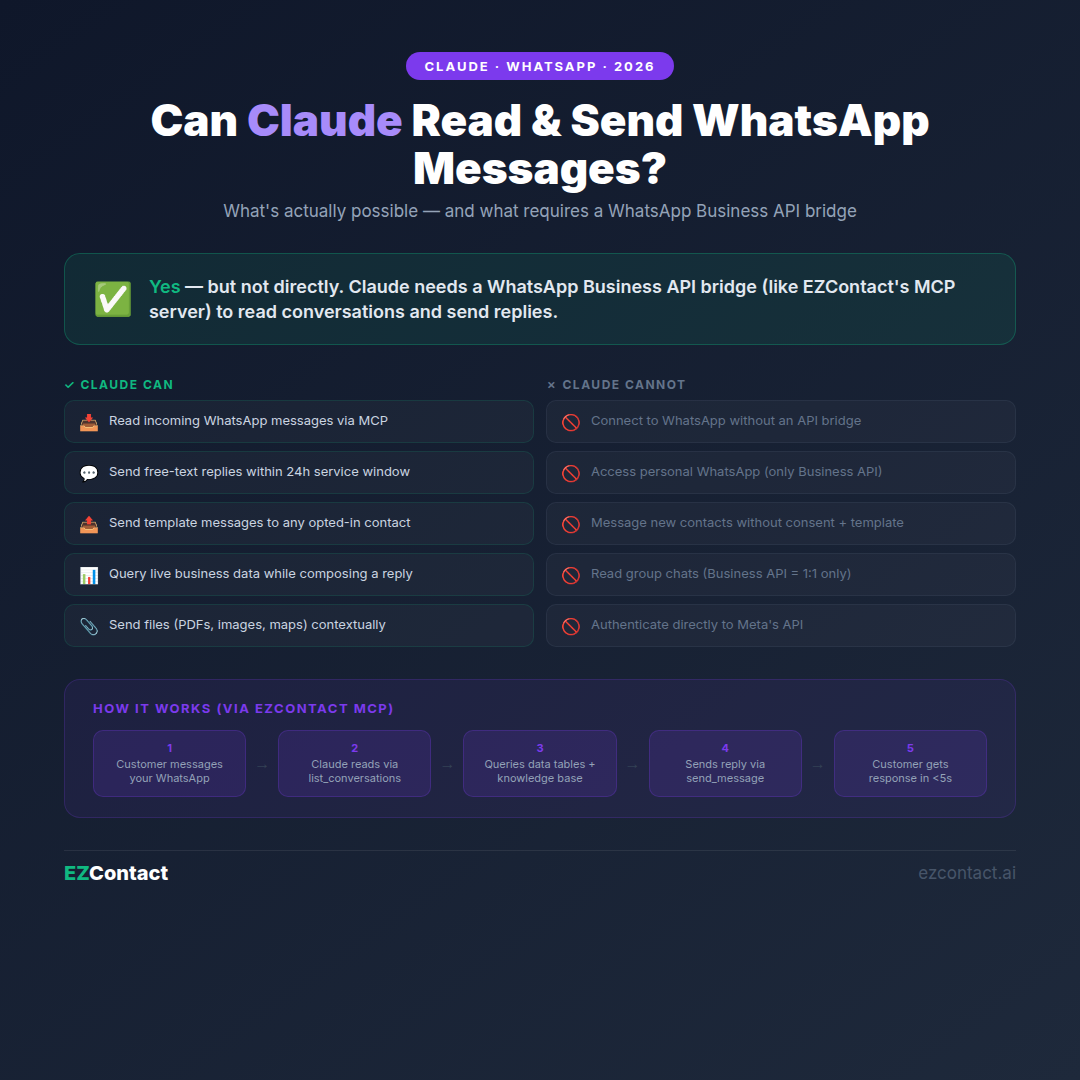
The short answer
| Capability | Possible? | How |
|---|---|---|
| Read incoming WhatsApp messages | ✅ Yes | Via MCP server (EZContact) |
| Send replies in an open conversation | ✅ Yes | Via MCP server, within 24h window |
| Send outbound messages to new contacts | ✅ Yes (templates only) | Via approved HSM templates |
| Access conversation history | ✅ Yes | Full thread via MCP |
| Query your business data while responding | ✅ Yes | Via Data Tables MCP tool |
| Send files (PDFs, images, documents) | ✅ Yes | Via MCP file tool |
| Connect to WhatsApp natively without a bridge | ❌ No | WhatsApp doesn’t expose a direct API for AI models |
| Access personal WhatsApp (not Business) | ❌ No | Personal WhatsApp has no supported API |
| Read WhatsApp messages without API access | ❌ No | Requires WhatsApp Business API |
Why Claude can’t access WhatsApp directly
WhatsApp doesn’t offer an API that AI models like Claude can call directly. Meta controls the WhatsApp Business API — and accessing it requires:
- A verified Meta Business Portfolio
- An approved WhatsApp Business number connected to the API
- A WhatsApp Business Solution Provider (BSP) or direct API partner to handle the connection
Claude, by itself, has none of these. Claude is a language model — it can reason about text, generate replies, and call external tools — but it has no inherent network credentials to connect to WhatsApp’s infrastructure.
The solution: an MCP server that acts as the authenticated bridge between Claude and WhatsApp.
How Claude reads WhatsApp messages
When Claude is connected to EZContact via MCP, it calls the get_conversation or list_conversations tools:
Claude → MCP call: list_conversations(status="open", limit=10)

MCP server response:
[
  {
    "id": "conv_8821",
    "contact": { "name": "Ana Martínez", "phone": "+52 55 1234 5678" },
    "last_message": "Buenas, quisiera saber el precio del plan Pro",
    "timestamp": "2026-08-12T13:02:00Z",
    "status": "open",
    "unread": true
  },
  ...
]
Claude receives this structured data as a tool response and can then reason about each conversation — drafting replies, identifying intent, checking your knowledge base or data tables, and deciding what to do next.
For a specific conversation, Claude calls get_conversation to retrieve the full message thread:
Claude → MCP call: get_conversation(id="conv_8821")

MCP response:
{
  "contact": { "name": "Ana Martínez", "phone": "+52 55 1234 5678" },
  "messages": [
    { "from": "contact", "text": "Hola", "timestamp": "..." },
    { "from": "agent", "text": "¡Hola! ¿En qué puedo ayudarte?", "timestamp": "..." },
    { "from": "contact", "text": "Quisiera saber el precio del plan Pro", "timestamp": "..." }
  ]
}
Claude now has the complete conversation context and can respond accordingly.
How Claude sends WhatsApp messages
Within the 24-hour service window
When a customer has messaged you within the last 24 hours, Claude can send a free-text reply:
Claude → MCP call: send_message(
  conversation_id="conv_8821",
  text="Hi Ana! The Pro plan is $49/month, which includes unlimited AI conversations,
        human handoff, Data Tables, and all channels (WhatsApp, Instagram, Messenger).
        Would you like me to send you the full feature comparison?"
)

MCP response: { "status": "sent", "message_id": "msg_9923" }
The message arrives in Ana’s WhatsApp as a normal message from your business number.
Outside the 24-hour window (templates)
If no message has been received in the last 24 hours, WhatsApp requires using a pre-approved template message (HSM). Claude uses send_template:
Claude → MCP call: send_template(
  contact_phone="+52 55 1234 5678",
  template_name="follow_up_inquiry",
  parameters=["Ana", "plan Pro", "ezcontact.ai/pricing"]
)
Template messages must be approved by Meta before use. EZContact’s platform handles template submission and management.
What Claude does between reading and sending
The power isn’t just in reading or sending — it’s in what Claude reasons through in between.
Example: Claude handling a pricing inquiry
list_conversations→ finds 3 unread conversationsget_conversation("conv_8821")→ reads Ana’s question about the Pro planquery_data_table("pricing")→ fetches current pricing from Data Tablessearch_knowledge_base("Pro plan features")→ retrieves feature list- Composes a personalized, accurate reply
send_message(...)→ sends the reply
All of this happens in a single Claude reasoning session. The customer gets an immediate, accurate, context-aware response — without a human typing anything.
Two operational modes
Mode 1: Claude as a Copilot (human-in-the-loop)
Your team uses Claude Desktop with EZContact’s MCP server configured. Claude reads conversations and drafts replies. A human reviews and approves before sending. Best for high-stakes conversations where human judgment matters.
Typical flow:
- Team member asks Claude: “Show me all unanswered messages and draft replies for each”
- Claude reads 8 conversations, queries data tables, drafts personalized replies
- Team member reviews, edits if needed, clicks send
Mode 2: Autonomous agent (no human needed per message)
Claude runs 24/7 inside EZContact as a deployed agent. It handles incoming WhatsApp messages automatically — reads, reasons, responds. Escalates to a human when:
- The customer explicitly asks for a person
- The inquiry falls outside the configured scope
- A frustrated tone or escalation trigger is detected
In this mode, the MCP loop runs server-side. No Claude Desktop required.
What Claude cannot do with WhatsApp
Personal WhatsApp: Claude cannot access WhatsApp personal accounts (the app on your phone). Only WhatsApp Business API numbers — connected through a BSP or direct API partner like EZContact — can be programmatically accessed.
Sending to new contacts without consent: WhatsApp requires opt-in before you can send outbound messages to new contacts. You can message people who’ve messaged you first (within 24 hours, free-form). For contacts who haven’t reached out, you need an approved template message and proof of prior opt-in.
Voice notes: WhatsApp voice messages cannot be processed by Claude via MCP in real time. Text messages are fully supported. Audio transcription can be added as a separate pipeline step.
Reading end-to-end encrypted personal chats: WhatsApp personal conversations use end-to-end encryption and are not accessible via any API. Only Business API messages are available.
Direct Meta API access without a BSP: Claude cannot authenticate directly to Meta’s WhatsApp Business API. A BSP or API partner (like EZContact) is required to handle API credentials, webhooks, and message compliance.
Setting up Claude to read and send WhatsApp messages
Step 1: Connect your WhatsApp Business number to EZContact
Go to ezcontact.ai → Sign up → Connect your WhatsApp Business number using Meta’s Embedded Signup (no BSP account needed, no developer required).
Step 2: Configure your AI agent
In EZContact, write a prompt describing your agent: what it does, what it answers, when to escalate. This deploys Claude as your autonomous WhatsApp agent.
Step 3 (optional): Claude Desktop Copilot mode
For team Copilot mode, install the EZContact MCP server (npm install -g @ezcontact/mcp-server), add your API key to Claude Desktop’s config, and restart. Claude can now read and send messages directly from the Claude Desktop interface.
Frequently asked questions
Can Claude read my WhatsApp messages without setting anything up? No. Claude has no native WhatsApp access. You need a WhatsApp Business API connection (via EZContact or another BSP) and an MCP server that exposes WhatsApp tools to Claude.
Can Claude send WhatsApp messages to any phone number? Only to contacts who have previously messaged you (within a 24-hour service window, free-form) or to any number using pre-approved template messages. You cannot send arbitrary messages to new contacts without prior opt-in.
Does my WhatsApp customer see that they’re talking to Claude? That depends on your configuration. Most businesses deploy Claude as a branded agent (“Hi, I’m Sofía from EZContact”) without disclosing the underlying AI model. When a human takes over, the conversation continues in the same thread — the customer sees a seamless experience.
Can Claude read group WhatsApp messages? WhatsApp Business API does not support group messages. Claude can only interact with 1:1 business conversations (the standard customer service channel).
Is this the same as Claude.ai connecting to WhatsApp? No. Claude.ai is Anthropic’s consumer interface. The WhatsApp integration described here uses Claude’s API (via Anthropic SDK) running inside EZContact’s infrastructure, not the Claude.ai web interface.
How is this different from just using a WhatsApp chatbot? A traditional chatbot follows decision trees or keyword triggers. Claude is a large language model — it understands context, handles unexpected questions, reasons across multiple data sources (your knowledge base + data tables + conversation history), and produces natural, on-brand responses. The quality difference is significant for complex or varied conversation flows.
More guides in this series
- Claude WhatsApp MCP: Complete Setup Guide (2026)
- Can Claude Connect to WhatsApp? Complete Setup (2026)
- Can ChatGPT Connect to WhatsApp?
- Can Google Gemini Connect to WhatsApp?
- Can Microsoft Copilot Connect to WhatsApp?
- Can DeepSeek Connect to WhatsApp?
The bottom line
Claude can read and send WhatsApp messages — but it needs a WhatsApp Business API bridge to do it. EZContact provides that bridge as an MCP server, giving Claude structured access to your inbox, your conversation history, your business data, and the ability to send replies within WhatsApp’s messaging rules.
The result: an AI agent that reads customer messages in real time, reasons with full context, queries your live business data, and responds — all automatically, 24/7, in the same WhatsApp thread your customers already use.
Start at ezcontact.ai → or message us on WhatsApp to see it in action.
Related articles
Aug 2026
EZContact vs Yalo: Best WhatsApp AI Platform for LATAM?
Compare EZContact vs Yalo for WhatsApp AI, conversational commerce, human handoff, implementation, and the right business fit in LATAM.
Aug 2026
EZContact vs Salesforce Service Cloud: WhatsApp Service Without Enterprise Complexity
Comparing Salesforce Service Cloud and EZContact for WhatsApp customer service? See the honest 2026 breakdown of AI, handoff, setup, pricing, and fit.
Aug 2026
WhatsApp Voice AI: Handle Calls, Voicemails & Customer Service with an AI Agent
WhatsApp Voice AI combines a 24/7 AI phone agent with WhatsApp follow-up, call summaries, appointment booking, and human handoff. See how the workflow works.
Put your WhatsApp to work with EZContact
An AI agent that knows your business, a unified inbox, and human handoff when needed. No complex flows — set it up with a single prompt.